
Bluetooth hearing aids are ‘Made For iPhone’ (MFi) hearing aids, which means they can easily connect to your iPhone, iPad® or iPod touch®. You can then stream sound directly from your phone to your hearing aids, and use their app to control your hearing aids from your screen.
-
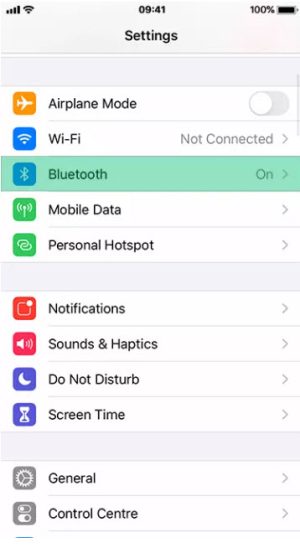
1- Go to Settings via your phone’s home screen. Make sure Bluetooth is turned on.
-
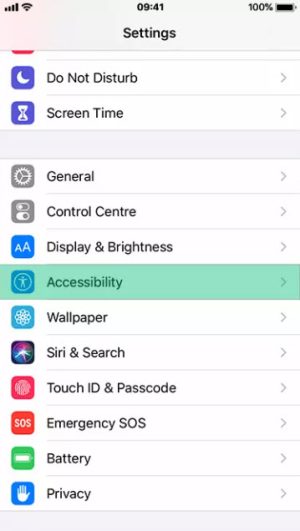
2- Scroll down a little and then select Accessibility
-
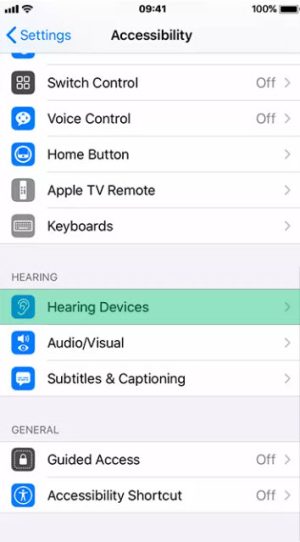
3. From the options on the Accessibility menu, select Hearing Devices.
-
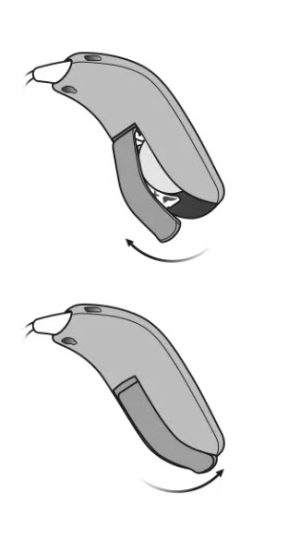
4- Restart your hearing aids or place them on the charger and take off
-
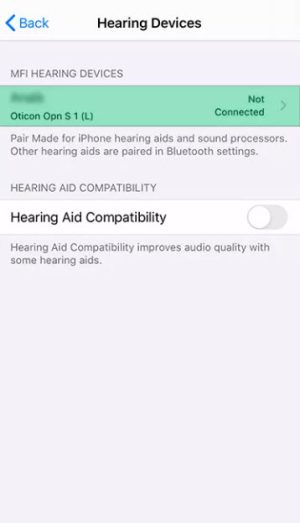
5. Once detected by your phone, tap the name of the hearing aids and confirm pairing in the pop-up.
Request a call back
Please complete the below form and one of our friendly staff will call you shortlyFree Online Hearing Test
Hearing tests check a person’s ability to hear the loudness and pitch of sounds. Some reasons why you may need a hearing test include ringing in your ears, others companing that you talk too loud or watch the TV on high volume, or simply you have trouble hearing conversations.
While there’s no replacement for a consultation with a hearing-care expert, our free online hearing screening can provide some quick and useful feedback about your hearing. The screening should be carried out in quite space and all you need is a pair of headphones!
Type your details to start your free hearing test